Clear audio is one of the most important parts of modern video production. A camera can capture detailed images, but if speech is difficult to hear, conversations are interrupted by background noise, or the microphone is positioned too far from the speaker, the finished video can become harder to follow.
This is why wireless microphone systems have become common among content creators, interviewers, educators, business professionals, travelers, and people recording everyday videos. A wireless setup can place the microphone closer to the person speaking while allowing the recording device to remain farther away.
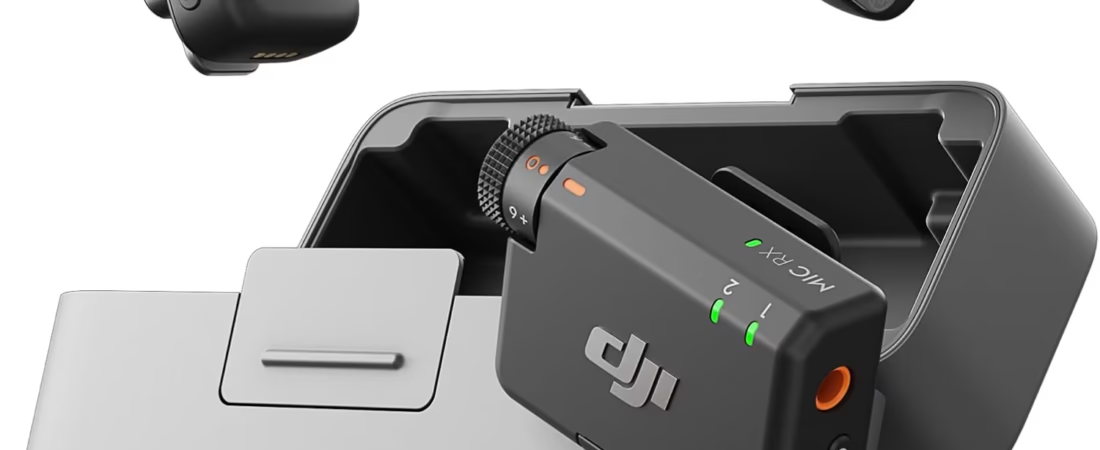
The DJI Mic Mini with 2 transmitters, 1 receiver, and a charging case is designed around this type of workflow. The system combines two wireless transmitters with a receiver, allowing creators to work with one or two speakers while keeping the setup relatively compact. Its design also emphasizes low weight and portability, which can be useful when recording for extended periods or moving between locations.
The system is intended for applications where reliable wireless audio, portability, and flexible microphone placement are important. Depending on the recording device and connection method, it can be used with cameras, smartphones, computers, and other compatible equipment.
It is worth remembering that a wireless microphone system does not automatically solve every audio problem. Recording environment, microphone placement, distance, clothing, wind, background noise, receiver compatibility, battery management, and recording settings can all influence the final result.
Understanding how the DJI Mic Mini works and what its components are intended to do can help users integrate it into different recording workflows.
What Is the DJI Mic Mini?
The DJI Mic Mini is a compact wireless microphone system designed for recording spoken audio.
The package configuration discussed here includes:
- Two transmitters
- One receiver
- A charging case
The transmitters are the components worn or positioned near the people speaking. They capture audio and transmit it wirelessly to the receiver.
The receiver connects to the recording device.
This arrangement is particularly useful when recording two people simultaneously. For example, an interviewer can wear one transmitter while the guest wears the second.
The charging case provides a way to store and recharge the system between recording sessions, while also keeping the components together.
Rather than treating the system as a single microphone, it is more useful to think of it as a small wireless audio ecosystem consisting of microphones, a receiver, charging hardware, and compatible recording equipment.
Key Features
Two Wireless Transmitters
Having two transmitters is one of the most practical aspects of this configuration.
Two transmitters allow audio to be captured from two speakers.
This can be useful for:
- Interviews
- Two-person podcasts
- Tutorials
- Presentations
- Travel videos
- Conversations
- Social media videos
- Educational recordings
- Business content
With two people speaking, each person can have a dedicated transmitter rather than sharing one microphone.
This can make microphone placement easier because the microphone can remain relatively close to each speaker.
The two-transmitter design also provides flexibility for solo creators. A creator can use one transmitter while keeping the second available for another speaker or another recording setup.
Compact and Lightweight Design
The product is positioned as an ultralight wireless microphone system.
Weight matters more than it may initially seem.
A microphone worn on a shirt, jacket, or other clothing can become noticeable if it is bulky or heavy. A compact transmitter can be easier to incorporate into everyday clothing, particularly during long recording sessions.
Lightweight equipment is also useful for travel.
Creators who carry a camera, lenses, tripod, batteries, storage cards, and other accessories may appreciate audio equipment that does not add substantial bulk to the kit.
Wireless Receiver
The receiver acts as the bridge between the transmitters and the recording device.
The transmitters capture the speakers’ voices and send the audio wirelessly to the receiver. The receiver then delivers the audio to the connected camera, phone, computer, or other compatible recording equipment.
This separation allows the person speaking to move naturally without remaining physically connected to the camera through a microphone cable.
That freedom can be particularly useful for walking videos, interviews, demonstrations, and presentations.
Charging Case
The included charging case provides storage and charging for the system’s components.
A dedicated case can serve several purposes at once.
It keeps the transmitters and receiver together, reduces the likelihood of individual pieces being misplaced, and provides a convenient way to prepare the equipment for another recording session.
For mobile creators, this is especially useful because audio accessories are small and easy to lose when they are stored separately.
A charging case also makes battery management easier because the system can be placed back into the case after recording.
Detail-Rich Audio Focus
The DJI Mic Mini is designed around clear voice capture and wireless audio transmission.
The microphone’s position relative to the speaker is one of the most important factors in achieving understandable speech.
When the microphone is placed closer to the speaker than the camera’s built-in microphone would typically be, the recording can contain a stronger direct voice signal relative to distant environmental sounds.
That does not mean the microphone eliminates all background noise or guarantees studio-quality audio in every environment.
The recording location still matters.
A quiet indoor room, busy street, windy beach, restaurant, and large echoing hall can produce very different results even when the same microphone system is used.
How Wireless Microphone Systems Work
A wireless microphone system generally has two sides.
The transmitter captures audio.
The receiver receives the transmitted audio and passes it to the recording device.
This arrangement is different from a traditional wired lavalier microphone, where the microphone is physically connected to the camera or recorder.
Wireless connectivity provides mobility.
A presenter can walk around a room without a microphone cable running back to the camera.
An interviewer and guest can sit several feet apart without requiring a long microphone cable between them.
The trade-off is that wireless systems depend on batteries and wireless communication. Users therefore need to consider charging, range, interference, and connection status.
How It Can Be Used
Interviews
Two-person interviews are a natural application for a two-transmitter system.
The interviewer can use one transmitter and the guest can use the other.
This allows each speaker to have a microphone positioned close to their voice.
For interviews conducted outside, creators should also consider wind protection and environmental noise.
For indoor interviews, room acoustics can be just as important.
A room with hard floors and bare walls may produce noticeable reflections and echo.
A microphone cannot completely remove poor room acoustics.
YouTube Videos
Creators producing YouTube content can use a wireless microphone system to improve the flexibility of their recording setup.
Instead of remaining directly beside the camera, the speaker can move within the practical wireless range of the system.
This can be useful for:
- Product demonstrations
- Tutorials
- Walkthroughs
- Educational videos
- Cooking content
- Home projects
- Technology videos
- Personal videos
The transmitter can be positioned near the speaker while the camera remains farther away.
Short-Form Social Media Content
Vertical videos for social platforms often involve creators speaking directly to the camera.
A wireless transmitter can simplify this type of recording because the microphone does not have to be physically connected to the phone or camera.
This can be especially useful for creators who record outdoors or move between locations.
The compact form factor can also make it easier to carry the audio system alongside a smartphone.
Travel Videos
Travel recording often involves changing environments.
A creator might record in a hotel, on a street, at a landmark, in a vehicle, or during an activity.
A wireless microphone can provide greater flexibility than relying exclusively on the camera’s built-in microphone.
However, travel environments can also introduce strong wind, traffic noise, crowds, music, and other sound sources.
Good microphone placement remains essential.
Educational Content
Teachers, trainers, and online educators can use wireless microphones when explaining a topic while moving around a room.
For example, a presenter could demonstrate a piece of equipment while remaining several feet away from the camera.
The microphone stays close to the speaker while the camera captures the demonstration.
Business Presentations
Wireless microphones are also useful for business videos.
A presenter can speak while moving around a presentation area rather than remaining beside the recording device.
This can be useful for internal training, promotional videos, demonstrations, and recorded presentations.
Two-Person Podcasts
A two-transmitter configuration can accommodate two speakers.
Each person can use a separate transmitter, allowing the recording to capture their voices independently at the microphone level.
The final editing workflow depends on how the receiver and recording device handle the channels.
Creators should verify their recording settings before an important session.
Smartphone Video
Modern smartphones are frequently used as video cameras.
When the phone and microphone system are compatible, a wireless microphone can provide an alternative to the smartphone’s built-in microphone.
This can be useful when the phone is positioned several feet away from the person speaking.
Before recording, users should confirm that the phone recognizes the connected receiver and that the recording application is actually using the external audio input.
Camera-Based Production
The receiver can be integrated into compatible camera workflows.
This is particularly useful when the camera is mounted on a tripod while the speaker moves around the scene.
For professional or semi-professional recording, users should also monitor battery levels, connection status, and available recording storage.
Who It May Be Suitable For
Content Creators
Creators producing regular video content may benefit from having a compact wireless microphone system available for different shooting environments.
Interviewers
The two-transmitter configuration is especially relevant to interviews involving two people.
YouTube Creators
Creators who record tutorials, demonstrations, commentary, or on-camera videos can use wireless audio to create more flexible camera positioning.
Social Media Creators
People recording short-form content can benefit from a microphone system that can travel with a smartphone or compact camera setup.
Educators
Teachers and trainers who record lessons can use wireless audio while moving around a room.
Business Professionals
Presenters and professionals creating training or informational videos can use wireless microphones when mobility is useful.
Travelers
A compact system can be convenient for creators who need portable audio equipment while traveling.
Small Production Teams
Small video teams may use two transmitters when recording interviews, discussions, or two-person scenes.
Important Things to Consider
Check Device Compatibility
Before using the system, verify that the receiver is compatible with the intended recording device and connection method.
Cameras, smartphones, tablets, computers, and other recording devices can use different connectors and audio configurations.
A connector physically fitting into a device does not always guarantee that the recording application will recognize the microphone correctly.
Compatibility should therefore be checked before an important recording session.
Battery Management
Wireless equipment depends on battery power.
The transmitters and receiver should be charged before recording.
The charging case can make this easier by providing a central place to store and charge the system.
For longer shoots, it is useful to check battery levels before beginning.
Professional productions may also benefit from having a backup audio plan.
Wireless Range
Wireless systems have practical operating ranges rather than unlimited distances.
Obstructions, walls, other wireless equipment, interference, and environmental conditions can affect connectivity.
The maximum advertised range should not be interpreted as a guaranteed range in every environment.
A clear outdoor environment may behave differently from a crowded indoor venue with walls and other wireless devices.
When recording, keeping the transmitter and receiver within a reasonable range and maintaining a suitable line of communication can reduce potential connection problems.
Background Noise
A wireless microphone does not automatically make a noisy environment quiet.
If someone is speaking next to heavy traffic, construction equipment, loud music, or a crowded venue, the microphone can still capture some of that sound.
The best approach is usually to improve the recording environment whenever possible.
Moving away from a loud source, choosing a quieter location, and positioning the microphone appropriately can have a significant effect on voice clarity.
Wind
Outdoor recording presents a separate challenge.
Wind can create strong low-frequency noise when it reaches a microphone.
Using appropriate wind protection can help reduce this problem.
Creators recording outdoors should think about wind direction and microphone placement before starting.
Clothing Noise
Lavalier-style microphones and compact transmitters can come into contact with clothing.
Movement can create rubbing sounds.
Loose fabric, necklaces, jackets, or other accessories can sometimes produce unwanted noise when they touch the microphone.
Positioning the transmitter carefully and checking a short test recording can help identify clothing noise before the full recording begins.
Room Acoustics
Indoor recordings can suffer from echo.
Large rooms with hard surfaces tend to reflect sound.
A microphone positioned close to the speaker can reduce the relative effect of distant room reflections, but room acoustics still matter.
Soft furnishings, curtains, carpets, and other sound-absorbing materials can sometimes help create a more controlled recording environment.
Two-Speaker Recording
When two transmitters are used, users should understand how their recording device receives the two audio signals.
Depending on the equipment and configuration, the channels may be combined or separated.
Separate channels can be useful during editing because the volume of each speaker can be adjusted independently.
Users should test the complete workflow before an important interview.
Microphone Placement
Placement has a major influence on audio quality.
A transmitter positioned too far from the speaker may capture more room sound.
A transmitter placed too close to clothing may capture fabric noise.
A transmitter positioned near jewelry or accessories may pick up unwanted contact sounds.
For speech recording, the general goal is to position the microphone close enough to the speaker’s voice while keeping it clear of objects that may create noise.
The ideal position can vary depending on the person’s clothing and the recording environment.
A short test recording is often more useful than assuming a particular placement will work perfectly.
Recording Indoors
Indoor environments provide greater control than many outdoor locations, but they have their own challenges.
When recording in a quiet room, place the speaker away from obvious noise sources such as:
- Air-conditioning units
- Fans
- Refrigerators
- Open windows
- Computer cooling fans
- Traffic-facing walls
Echo can also be reduced by selecting a room with more soft furnishings.
A small furnished room may produce a different acoustic result from a large empty room.
Recording Outdoors
Outdoor recordings require more preparation.
Wind is one of the most common problems.
Traffic, pedestrians, construction, birds, music, and other environmental sounds can also affect the recording.
Before starting, listen to the location for a few seconds.
This simple habit can reveal sounds that may not be obvious while setting up the camera.
If the environment is too noisy, moving a short distance may make a noticeable difference.
Audio Monitoring and Test Recordings
A short test recording is one of the simplest ways to reduce technical surprises.
Before recording an important interview or presentation, speak into the microphone and listen to the result.
Check:
- Whether the recording device recognizes the microphone
- Whether both transmitters are working
- Whether the audio level is appropriate
- Whether clothing noise is present
- Whether wind is affecting the microphone
- Whether the voice sounds clear
- Whether both speakers are being captured
Testing takes little time compared with repeating an entire recording session.
DJI Mic Mini vs. Wired Lavalier Microphone
A wired lavalier microphone connects directly to a recording device through a cable.
Its main advantage is simplicity.
There is no wireless transmitter-to-receiver link to manage.
However, the cable can limit movement.
A wireless system such as the DJI Mic Mini removes that physical cable between the speaker and receiver.
The trade-off is the need to manage batteries and wireless connectivity.
For stationary recording, a wired microphone may be perfectly adequate.
For moving subjects or two-person interviews, wireless connectivity can provide additional flexibility.
DJI Mic Mini vs. Camera Built-In Microphone
Cameras commonly include built-in microphones.
These are convenient because they require no additional equipment.
However, the microphone is physically located on the camera.
If the camera is several feet away from the speaker, the microphone also becomes farther from the voice.
A wireless transmitter can be placed much closer to the speaker.
This can change the relationship between the speaker’s voice and environmental sound.
For situations where the camera must remain distant, an external microphone system can therefore be useful.
DJI Mic Mini vs. Smartphone Microphone
Smartphones are capable of recording useful audio, especially in favorable environments.
The challenge is distance.
If the phone is positioned on a tripod several feet away, the built-in microphone also remains several feet away.
A wireless microphone allows the speaker to carry the audio capture point while the phone remains positioned for video.
This can be particularly useful for social media videos, tutorials, interviews, and presentations.
DJI Mic Mini vs. Traditional Camera Wireless Systems
Traditional wireless microphone systems can be designed for professional productions and may offer extensive configuration options.
The appropriate system depends on the production requirements.
A compact wireless system focuses on portability and ease of use.
A larger professional setup may provide different connector options, more advanced monitoring capabilities, specialized transmitters, or other production features.
Users should select equipment based on their actual workflow rather than assuming a larger system is always necessary.
Managing a Two-Transmitter Setup
When two people are recording, organization becomes more important.
Before starting:
- Charge both transmitters and the receiver.
- Identify which transmitter is being used by each speaker.
- Position each microphone carefully.
- Confirm that both transmitters are connected.
- Make a short test recording.
- Check the recorded audio.
- Confirm the camera or phone has sufficient storage and battery.
This preparation is especially useful for interviews because stopping halfway through a conversation to solve an audio problem can disrupt the natural flow.
Storage and Transport
The charging case provides a convenient home for the system when it is not being used.
Keeping all components together can reduce the chance of leaving a transmitter or receiver behind.
For travel, the microphone system can be stored with other essential recording accessories.
Users should still protect the equipment from excessive moisture, impact, extreme temperatures, and other environmental conditions that could damage electronic components.
Practical Workflow for Creators
A simple recording workflow can make wireless audio easier to manage.
Start by deciding where the camera will be placed.
Then determine where the speakers will stand or sit.
Place the transmitters close to the speakers while keeping them away from clothing that may rub against the microphone.
Connect the receiver to the recording device.
Confirm the device recognizes the audio source.
Make a short test recording.
Only after confirming the audio should the full recording begin.
This workflow is useful because audio problems are often easier to fix before filming than during post-production.
Frequently Asked Questions
What comes with the DJI Mic Mini configuration?
The configuration discussed here includes two transmitters, one receiver, and a charging case.
Why are there two transmitters?
Two transmitters allow the system to capture audio from two speakers. This makes the configuration useful for interviews, conversations, presentations, and other two-person recordings.
What does the receiver do?
The receiver receives the wireless audio transmitted by the microphone transmitters and connects that audio system to a compatible recording device.
Can one person use the system?
Yes. A two-transmitter configuration can also be used for solo recording, with the second transmitter kept available for another person or another recording setup.
Can it be used for interviews?
Yes. Two transmitters make the system suitable for two-person interview setups, provided the recording equipment is compatible.
Can it be used with a smartphone?
It can be used with compatible smartphones and the appropriate receiver connection. Users should verify compatibility and make sure the recording application recognizes the external microphone.
Can it be used with a camera?
Yes, when the camera and receiver connection are compatible.
Can it be used for YouTube videos?
A wireless microphone system can be useful for YouTube videos, particularly when the creator needs to move away from the camera or wants closer microphone placement.
Is the DJI Mic Mini suitable for outdoor recording?
It can be used for outdoor recording, but environmental conditions matter. Wind, traffic, crowds, and other sounds can affect audio quality, so appropriate microphone placement and wind protection are important.
Does the microphone eliminate background noise?
Users should not assume that wireless microphone equipment completely eliminates background noise. Environmental sound can still be recorded. Noise-reduction features, when available and appropriately configured, can help in certain situations, but recording location and microphone placement remain important.
Does a wireless microphone work from any distance?
No. Wireless systems have practical transmission ranges, and real-world performance can be affected by obstacles, interference, walls, and other environmental conditions.
Does the charging case charge the transmitters and receiver?
The charging case is designed to provide storage and charging for the included system components. Users should follow the manufacturer’s charging instructions for the specific configuration.
How long does the battery last?
Battery performance depends on the individual component, operating conditions, settings, and usage. Users should refer to the manufacturer’s specifications for rated battery figures and allow additional margin for real-world recording sessions.
Can I use both transmitters simultaneously?
The two-transmitter configuration is intended for situations where two speakers need to be recorded through the wireless system. The exact channel and recording behavior depends on the connected recording device and configuration.
Why does my recording contain clothing noise?
Clothing noise can occur when fabric or accessories rub against the microphone or transmitter. Adjusting placement and keeping the microphone away from moving fabric can help reduce unwanted sounds.
Why does outdoor audio sound noisy?
Outdoor environments contain many unpredictable sound sources, including wind, traffic, people, and machinery. A microphone captures sound from its surroundings, so choosing a quieter position and using suitable wind protection can improve the recording.
Can the system replace a studio microphone?
Not necessarily. Wireless microphones and studio microphones are designed for different workflows. A studio microphone can be appropriate for controlled indoor recording, while a wireless system is more useful when mobility and compact setup are important.
Is a wireless microphone better than a wired microphone?
The two approaches have different characteristics. Wireless microphones provide greater freedom of movement, while wired microphones avoid wireless transmission and battery-management requirements. The appropriate choice depends on the recording environment.
Can I use it for online meetings?
Potentially, provided the computer or mobile device and connection method support the receiver as an external audio input. Users should test the microphone with the specific meeting application before an important call.
Should I test the microphone before recording?
Yes. A short test can identify connection problems, incorrect input selection, clothing noise, wind, low audio levels, or other issues before the main recording begins.
Conclusion
The DJI Mic Mini with two transmitters, one receiver, and a charging case is designed to provide a compact wireless audio solution for creators and other users who need more flexible microphone placement.
Its two-transmitter configuration is particularly relevant to interviews, conversations, presentations, and other situations involving two speakers. For solo creators, the second transmitter can provide additional flexibility for future recordings.
The lightweight design can also be useful for people who carry their recording equipment between locations. A compact microphone system is easier to integrate into a mobile video kit than a collection of larger audio components.
The charging case adds another practical element by keeping the transmitters and receiver together while providing a way to recharge the equipment between sessions.
One of the main benefits of a wireless microphone workflow is the ability to place the microphone closer to the speaker while keeping the camera or phone farther away. This can be particularly useful for tutorials, travel videos, presentations, interviews, social media content, and home-office recording.
At the same time, wireless audio requires some preparation.
Users should verify compatibility with their camera, smartphone, computer, or other recording device. Battery levels should be checked before recording, and the wireless connection should be tested in the environment where filming will take place.
Audio quality is also strongly influenced by factors beyond the microphone itself. Wind, clothing movement, room echo, traffic, background conversations, appliances, and microphone placement can all affect the finished recording.
A short test recording can therefore be one of the most valuable parts of the workflow. It provides an opportunity to check whether both transmitters are working, whether the receiver is recognized by the recording device, and whether unwanted environmental noise is present.
The DJI Mic Mini can be understood as a flexible audio tool rather than a solution that automatically produces perfect recordings in every environment. Its value comes from combining wireless microphone placement, a two-transmitter configuration, a dedicated receiver, and a compact charging-and-storage approach.
For people creating interviews, educational videos, business presentations, travel content, social media clips, tutorials, or other spoken-word recordings, understanding how to use those components effectively can make the recording process more organized and adaptable.
As with any wireless recording equipment, the most reliable results come from matching the system to the recording device, environment, and intended workflow.